 AutoReady
Go grab a snack. Your match accepts itself.
A Windows app that accepts your match while you're away, and pings your PC or phone so you're back in time.
- Dota 2
- Counter-Strike 2
- League of Legends
 Deadlock beta

Safe by design
It does what you'd do. Nothing more.
Only looks and clicks
It watches the game window and presses Accept, like a person. It never reads game memory or injects code.
Never clicks in a match
It only looks for the popup while you're in queue, and stops once the match is on.
No accounts or telemetry
No sign-up and no ads. Your screenshots and settings never leave your PC.
No admin rights
It installs for your user only and uninstalls from Windows Settings, like any app.
Setup
Ready in a minute. Really.
- 01
Download it and open it
It installs for your user and lives in the tray, next to the clock.
- 02
Queue up like always
When the match pops, AutoReady accepts it and lets you know.
- 03
Add your phone, if you want
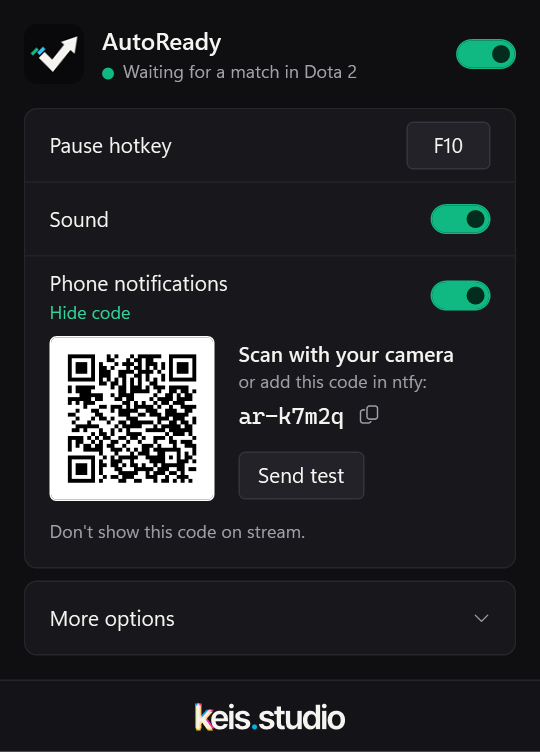
Scan the QR in the panel with the free ntfy app. No sign-up.
Questions
Before you download.
Can I get banned for this?
AutoReady only looks at the game window and presses Accept, like you would. It doesn't read or change game memory and doesn't inject anything. No tool can promise zero risk, but nothing here touches the match itself. More detail
Why does Windows show a warning?
Windows warns about apps it hasn't seen much yet, and AutoReady is new. Code signing is in progress. Until then, click More info → Run anyway. Every release is built from the public source code and scanned with Microsoft Defender.
Which games does it work with?
Dota 2, Counter-Strike 2 and League of Legends, plus Deadlock in beta. Play something else? Ask for your game; a screenshot of the popup helps a lot.
Can I use it to stay AFK?
No. It's there so you don't miss a match while you grab something. Accept, then come back: leaving hurts the rest of your team.
Does it cost anything?
No. It's free and open source (MIT), with no ads and no account.